
Reviewing & comments
Reviewing works the way it does on GitHub: read the diff, comment on a line or a range of lines, reply, resolve, and tick files Viewed as you go. The difference is where it goes: every comment is saved to a plain YAML comment file that your agent reads and replies to, and its replies appear in the browser as it works.
Files changed
Section titled “Files changed”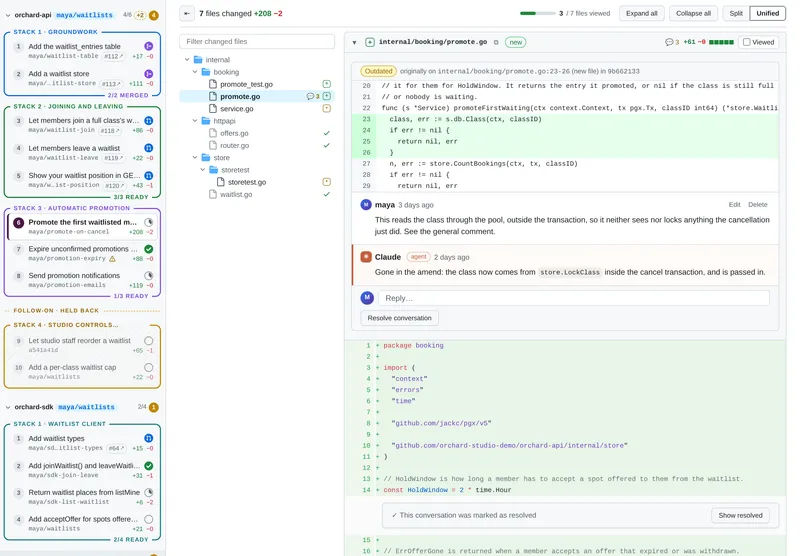
- Split or Unified view (remembered). The unified view has old and new line-number columns.
- Expand all / Collapse all, and a file tree: directories collapse, single-child chains are compacted, the file you’re reading is highlighted, and there’s a filter.
- Viewed: a checkbox per file, saved to the comment file. A viewed file collapses, and the toolbar shows your progress.
- Context: the bars between hunks expand 20 lines up or down, or Expand all.
- Big and odd files: files with more than 800 changed lines show “Load diff” instead of the diff. Binary files, pure renames and empty files get their own placeholders. Off-screen diffs render as you scroll.
n/pgo to the next / previous file (Keyboard shortcuts).
Diffs are rendered with @pierre/diffs (Shiki’s github-light / github-dark themes), from the
full old and new file contents, so you can expand any unchanged context. Each commit is diffed against its first
parent.
Inline comments
Section titled “Inline comments”- One line: hover a diff line and click the blue + in the gutter.
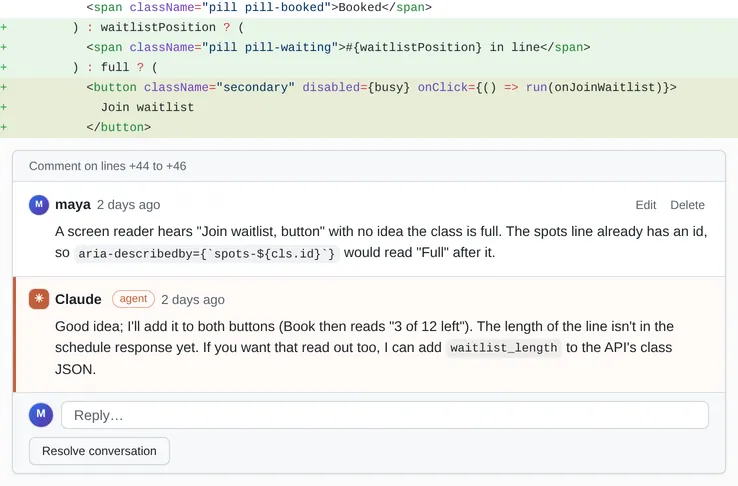
- A range: drag over the line numbers (or the +), or click one line number and shift-click another. A multi-line selection opens the comment form.
- Across old and new lines: a range that mixes deleted and added lines in the unified view keeps both ends exactly
(“Comment on lines -12 to +15”, stored with
start_side). If one end is an unchanged line, it’s saved on one side.
Threads render under their (last) line, with Reply and Resolve / Unresolve. Range threads say “Comment on lines +40 to +42” and their lines are tinted, more strongly while you hover the thread. Resolved threads collapse. A thread whose line isn’t in a shown hunk is listed at the top of its file card.
When the commit is amended or rebased, threads follow their code; one whose code is gone is marked Outdated and shows the original lines. See Following rebases.
General comments
Section titled “General comments”The Conversation tab holds the PR’s general threads (those without a file and line), with the same Reply and Resolve. Outdated threads show there too, with an “Outdated” label and their original code.
Who you are
Section titled “Who you are”Your comments are stored as author: <id>, and only yours can be edited or deleted in the UI. An agent’s
(author: claude) never are. Your name comes from LOCAL_REVIEW_USER, else git config user.name, else $USER, and
your id is its first word, lowercased (“Ada Lovelace” → ada). If your comment files were written under another id,
set LOCAL_REVIEW_USER to it to keep them yours. See
Environment variables.
Deleting your comment removes it from the file; the previous version is in the snapshots.
Getting your agent to reply
Section titled “Getting your agent to reply”Your agent works through the open threads, fixes the commits, replies in each thread and resolves the ones that were clear instructions it carried out exactly; the rest it leaves for you. The quickest way to start it off is the hand-off prompt.