
PR stacks
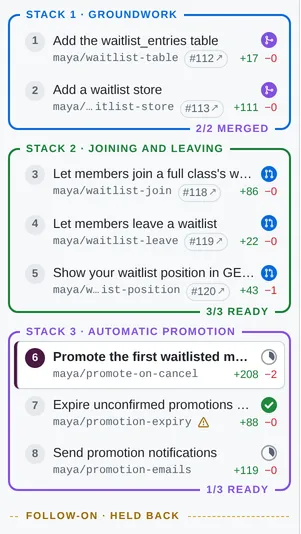
Each repo’s commits are split into consecutive, colour-coded PR stacks: groups of PRs that go up to GitHub
together, one coherent chunk of work each. You pick each stack by the commit it starts_at, usually by its subject, so
stacks survive rebases.
stacks: - title: Groundwork starts_at: "Add the config loader" - title: The feature itself starts_at: "Add the feature flag"flowchart BT
base[(origin/main)]
subgraph s1 [Stack 1 · Groundwork]
direction BT
c1[PR 1 · Add the config loader] --> c2[PR 2 · Read config at startup]
end
subgraph s2 [Stack 2 · The feature itself]
direction BT
c3[PR 3 · Add the feature flag] --> c4[PR 4 · Wire the flag into the UI]
end
base --> c1
c2 --> c3
How stacks are formed
Section titled “How stacks are formed”- A stack runs from its
starts_atcommit up to the next stack’s start. - The first stack may leave out
starts_at: it then starts at the first commit. (Any other stack without one is empty, with a warning.) - Commits before the first stack go into an implicit grey, dashed Unstacked group.
- No
stacks:at all means one stack, named after the branch. - PR numbers (“PR 3”,
#3) run 1..n across the whole repo, oldest first, not per stack, so they don’t change when you regroup.
To regroup, edit starts_at. The UI picks it up live.
How starts_at picks a commit
Section titled “How starts_at picks a commit”starts_at is tried as:
- a hex sha prefix, 7 or more characters (quote it in YAML, or it may be read as a number);
- a commit subject, compared after trimming, collapsing whitespace and stripping
fixup!/squash!/amend!; - failing those, a PR title (a
title:override in the PR’s prs file), the same way.
Subjects survive rebases, so prefer them. A landed PR’s subject is its stored one, so a stack whose bottom PRs have merged keeps its shape.
With duplicate subjects, the first match after the previous stack’s start is used. A selector that matches nothing, or only commits at or before the previous stack’s start (out of order), makes that stack empty and shows a warning on the repo in the sidebar.
Colours
Section titled “Colours”A stack’s color: is one of blue, green, purple, orange, pink, teal, red, or a "#hex". Without one,
stacks cycle through that list in order.
Yellow is reserved for follow-on stacks. A follow-on stack is always yellow,
whatever its color: says (the field can be left out), and color: yellow on a regular stack gives a warning and
falls back to the colour it would have had by default. (Hex colours aren’t checked for yellowness.)
Stack notes
Section titled “Stack notes”A stack’s description: is its stack note: Markdown that says how this stack relates to the others (“First of
three stacks: …”). It’s shown on the project homepage and in the Project context box of each of the stack’s PRs, it can
be edited in place, and it goes after the project intro in each of the stack’s
full PR bodies.
Totals
Section titled “Totals”Every aggregate counts regular stacks’ unmerged PRs only, and mentions follow-on stacks and merged PRs beside it:
2 repos · 4 stacks · 12 PRs · +3,300 −150 · +1 follow-on stack (2 PRs) · +9 mergedThat applies to the stack picture’s summary line and repo headings, the homepage’s totals, the sidebar’s viewed count and the project switcher’s commit count. A stack whose PRs have all merged isn’t counted among the stacks. A stack’s own heading and its PRs still show their real numbers.
When only follow-on work is in view (the picture of just a follow-on stack), its numbers are shown, labelled
1 follow-on stack · 2 PRs. Likewise when only merged work is (an archived project): 1 repo · 1 stack · 9 merged PRs.
The arithmetic lives in shared/totals.ts, used by both the server and the UI, so they agree.
Stacks and GitHub
Section titled “Stacks and GitHub”A Local Review stack is a unit of review and of publishing: when it’s ready, an agent opens it on GitHub as stacked PRs, one stack at a time. Each repo becomes one GitHub stack, grown one Local Review stack at a time. See Publishing as GitHub stacked PRs, and Works with your stacking tool if you use something other than GitHub’s own.