
Following rebases
Stacks get rewritten all the time: a fixup squashed into a reviewed commit, a reword, a rebase onto a newer main.
Every rewrite gives the commits new shas, but your review is filed under the old ones. Local Review re-attaches each
file to its rewritten commit, then re-places each inline thread on the line it was about. Nothing is ever dropped:
a thread whose code is gone is marked outdated, not deleted.
flowchart TB
  old["reviews/my-service/<b>89abcdef</b>.yaml<br/>(commit rebased away)"] -->|"same patch-id, Change-Id or subject"| new["shown on commit <b>0123abcd</b>"]
  new -->|"on the next write"| moved["saved as 0123abcd….yaml<br/>old file → *.superseded-by-0123abcd.yaml.bak"]
The same rules apply to reviews/ (comments) and prs/ (title/description overrides, readiness, branch, GitHub PR).
Which file belongs to a commit
Section titled “Which file belongs to a commit”When a commit has no file under its own sha, the server looks at the orphaned files in the same repo directory:
<sha>.yaml files whose sha is no longer in the repo’s range.
These are never taken:
- a file whose commit is still in the range (landed PRs count as in it);
- a prs file with a
landed:block (and landed PRs never take a file themselves); - a file whose commit is still an ancestor of the range end: it only left the range because
base/frommoved (e.g. it landed upstream), it wasn’t rewritten; - a review file whose
repo_pathis a different repo and whose sha this repo doesn’t have.
A file without patch_id, subject or change_id (a hand-written one) gets them from git for its sha.
The assignment is computed for the whole range, deterministically, in this order:
- Exact sha:
<repo>/<sha>.yamlexists. Nothing else is tried. - Same patch-id (
patch_id): a pure rebase (e.g. onto a newer main) or a reword. - Same Change-Id trailer (
change_id), if the commit has one. This goes before the subject because it’s an explicit identity. - Same subject, after stripping leading
fixup!/squash!/amend!and collapsing whitespace. Only used when the subject is unique among the range’s commits (twoWIPcommits never match by subject). This is what catches fixups and amends that change the patch.
Each level is tried for every commit (oldest first) before the next level. Each orphan goes to at most one commit. If several orphans qualify, the most recently modified file wins, then the lowest sha.
Until the next write, the comments are shown from the old file, and the Conversation tab says “Comments carried over
from <sha> (rebased; same …)”. On the next write the server saves them under the new sha, adds the old sha to
previous_commits, sets matched_by, and renames the old file to *.superseded-by-<sha8>.yaml.bak, so it isn’t
matched again. Nothing is deleted.
Line anchoring: how inline threads follow the code
Section titled “Line anchoring: how inline threads follow the code”- Creating an anchor. When an inline thread is created (by the UI, or found without an
anchoron the server’s next write), the server storesanchor: the commit, the location, the exacttextof the commented lines and up to 3 lines ofbefore/aftercontext, on that side of the file. An agent-written thread without an anchor is anchored on the file’scommit. If that’s an old, rebased-away commit that’s no longer in the repo, it’s anchored on the current commit instead. - Two locations.
path/side/line/start_linealways mean the location on the file’scommit.anchorkeeps the original location (like GitHub’soriginal_line/original_commit_id) and is never rewritten. The one exception: if it’s anchored on the current commit and you hand-editline, the anchor is recomputed there. - Finding the file. To place a thread on a commit other than
anchor.commit, the server finds the file in that commit’s diff bypath, then as the old side of a rename, then byanchor.path/anchor.old_path. - Finding the lines. It looks for
anchor.texton the same side: exact matches first, then matches that differ only in whitespace. The best match is the one where the mostbefore/afterlines still fit, then the one nearest the last known line. A blank commented line needs at least one context line to fit. - Other files. If the file isn’t in the diff under any of those names (e.g. a newly added file renamed by a fixup), other files are searched too, but only an exact match with at least 3 fitting context lines (or all of them, if fewer) is accepted.
- Mixed-side ranges. A range with
start_sideis anchored on its last line; its first line’s text (start_text) is then looked up onstart_sidenear the same shift. If that line is gone, the thread becomes a single-line thread on its last line. - Found: the thread is shown at the new line. The new location is written to
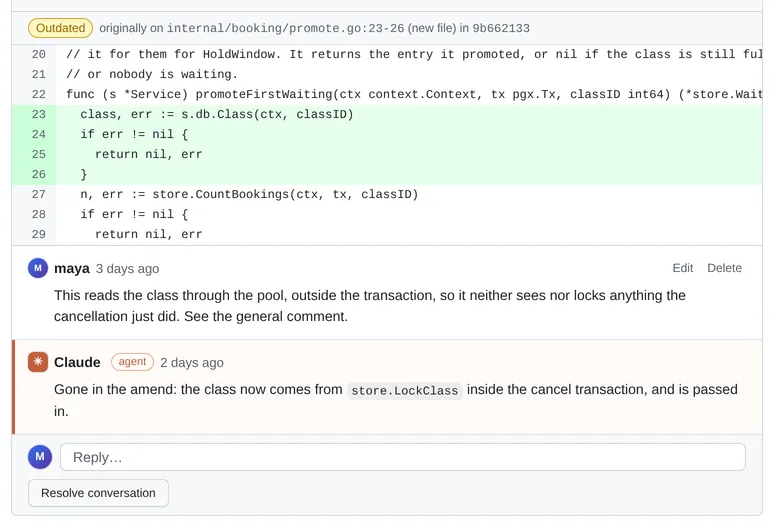
line/start_line/pathon the next write, andanchoris left as it was. - Not found (the line was deleted or rewritten, or the file left the commit): the thread is outdated. The API
returns
outdated: trueand the server writesoutdated: true, keepinglineas the last known location. The UI shows an “Outdated” label with the original code fromanchor, in the Conversation tab and at the top of the file’s card (in the Conversation tab only, if the file is gone from the commit). If the code comes back in a later rebase, the thread is placed again. Threads are never dropped.
Checking after a rebase
Section titled “Checking after a rebase”An agent can check that every thread re-attached:
curl -s http://localhost:5622/api/projects/my-feature/repos/my-service/commits/<new sha>/review \ | jq '{carried_over, threads: [.threads[] | {id, outdated, line}]}'outdated: true is expected where the agent deleted the commented lines; it should say so in its reply.